



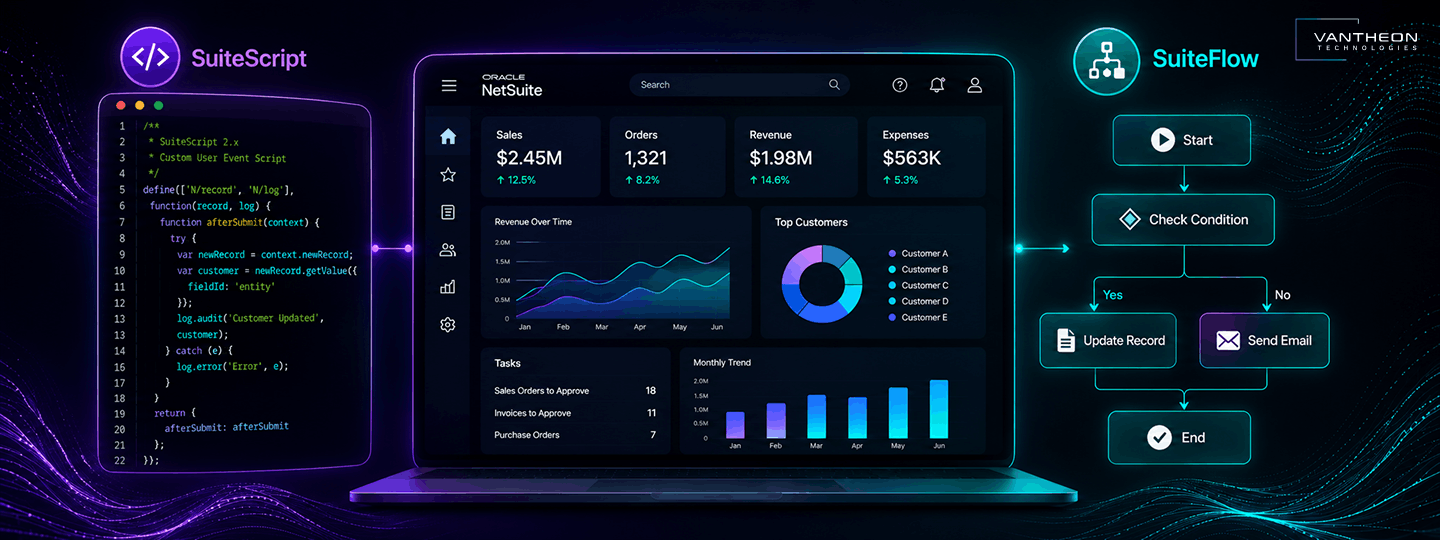
If you have spent any time researching how to adapt NetSuite to your business, you have probably run into three terms that get used interchangeably far more often than they should: SuiteScript, SuiteFlow, and SuiteApps. They are not the same thing; they are not interchangeable, and picking the wrong one for a given problem is one of the more common ways NetSuite implementations end up harder to maintain than they need to be.
This guide breaks down what each of these tools actually does, when to reach for which one, and how they typically work together in a real NetSuite environment, with a specific look at what this means for UAE and GCC businesses running multi-entity operations.
What Is NetSuite Customization?
NetSuite customization is the process of modifying or extending the platform so it better reflects an organization’s actual business processes, data structures, workflows, forms, dashboards, reports, integrations, and automation requirements, rather than forcing the business to adapt entirely to NetSuite’s default setup.
It helps to think of this as a progression rather than one single activity: configuration, then customization, then development, then third-party extension. Each step adds more capability and, generally, more complexity.
NetSuite Configuration vs Customization
Standard configuration generally relies on NetSuite’s built-in settings and point-and-click capabilities, things like enabling features, setting preferences, and adjusting fields through the user interface without writing code or building custom logic. Customization goes further and can involve SuiteFlow, SuiteScript, custom records and fields, custom dashboards, integrations, and other tools within the broader SuiteCloud platform.
Oracle groups NetSuite’s customization capabilities into three broad categories: point-and-click tools, scripting tools, and newer AI-powered customization tools. Understanding which category a requirement falls into is usually the first step in figuring out how to actually solve it.
Why Do Businesses Customize NetSuite?
Businesses customize NetSuite when standard functionality does not fully support their processes. Customization can help automate unique workflows, add business logic, create tailored dashboards and reports, connect external systems, and adapt the ERP to industry or organizational requirements.
Common reasons this comes up in practice include existing workflows that do not match NetSuite’s standard processes, complex approval structures, industry-specific requirements, custom reporting needs, automated calculations, custom dashboards, data validation rules, integration requirements, regional business processes, multi-subsidiary requirements, automated notifications, and specialized operational processes that standard NetSuite was never designed to handle out of the box.
Understanding the Three Main NetSuite Customization Options
At a high level, SuiteApps are customization technology equivalent to SuiteScript and SuiteFlow. A SuiteApp is a packaged application/extension, which may itself use SuiteScript, custom records, workflows, etc. In practice, they frequently work together on the same process.
| Technology | Primary Purpose | Technical Complexity |
| SuiteScript | Programmatic customization and business logic | High |
| SuiteFlow | Workflow and process automation | Low to Medium |
| SuiteApps | Packaged functionality and extensions | Varies |
What Is NetSuite SuiteScript?
SuiteScript is NetSuite’s JavaScript-based application programming environment for extending and customizing the platform. Oracle describes SuiteScript as a JavaScript-based API that can extend NetSuite beyond standard point-and-click customization, and it can be used to customize, search, and process NetSuite data.
What Can SuiteScript Do?
SuiteScript covers a wide range of capabilities, including custom business logic, data validation, automated calculations, record processing, custom user interfaces, external API integrations, custom searches, scheduled processing, custom dashboard portlets, automated notifications, data transformation, custom workflows, and batch processing.
Oracle’s documentation identifies several script types built for different purposes, including User Event Scripts, Client Scripts, Suitelets, Scheduled Scripts, Portlet Scripts, and other specialized types, each triggered by different events or contexts within NetSuite.
SuiteScript 2.1
SuiteScript 2.1 is the current version worth focusing on in modern NetSuite work. It is a JavaScript API built on a modular architecture, supporting both server-side and client-side scripting, Map/Reduce processing for large data volumes, custom modules, a broad set of APIs, and proper debugging capabilities. Oracle identifies SuiteScript 2.1 as the current version and documents its support for modern JavaScript capabilities across multiple script types, including newer capabilities like the N/llm module for developers who want to integrate generative AI into their custom scripts.
When Should Businesses Use SuiteScript?
SuiteScript makes the most sense for complex calculations, advanced validation rules, custom integrations with external systems, complex business rules that go beyond simple conditions, custom interfaces, and any process that genuinely cannot be handled through standard workflow tools. It is worth being direct here: SuiteScript is a development framework, so it generally requires technical expertise to build and maintain properly, not something a business user configures directly.
What Is SuiteFlow?
SuiteFlow is NetSuite’s tool for creating and running workflows that define and automate business processes for standard or custom records. Oracle describes it as a way to model states, transitions, and actions for records as they move through a business process, using a visual workflow diagrammer rather than writing code from scratch. It is more accurate to describe SuiteFlow as visual or low-code workflow automation rather than calling it strictly no-code, since real implementations can still involve technical considerations around scripting actions, execution context, and performance.
What Can SuiteFlow Automate?
SuiteFlow is commonly used for purchase approvals, vendor bill approvals, sales order approvals, journal entry approvals, notifications, record updates, status changes, lead nurturing, approval reminders, and conditional routing based on defined business rules. Oracle specifically lists complex approval processing, approval reminder emails, lead nurturing, related-record automation, and saved-search-based processing among its primary SuiteFlow use cases.
SuiteFlow Workflow Example
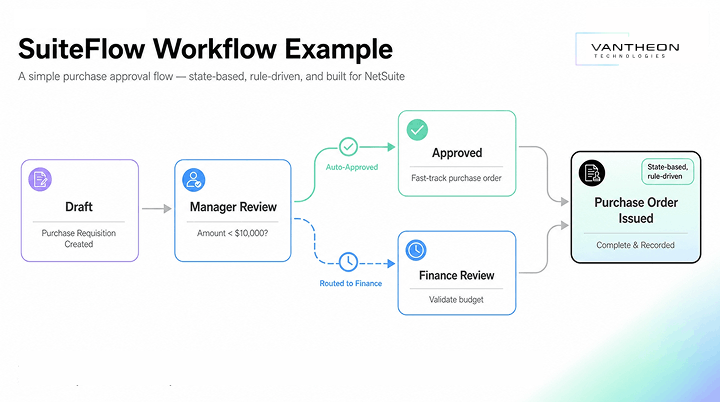
A simple purchase approval workflow illustrates how this works in practice:
This kind of state-based, rule-driven process is exactly what SuiteFlow is built for: a record moves through defined stages, with conditions determining which path it takes next.
What Are SuiteApps?
SuiteApps are applications that extend NetSuite functionality beyond what comes standard with the platform. Oracle states that SuiteApps are developed on the SuiteCloud platform and distributed through SuiteBundler or newer SuiteCloud Development Framework approaches, giving businesses a way to add capability without building it from scratch. It is worth being precise here: a SuiteApp is generally a packaged application or extension, not a form of custom development in itself, even though building one does involve development work on the vendor’s side.
Why Businesses Use SuiteApps
SuiteApps typically offer faster implementation than custom development, pre-built functionality for common needs, support for industry-specific requirements, additional integrations, specialized functionality that would otherwise need to be built in-house, a reduced need for custom development overall, and a way to extend existing NetSuite capabilities without touching the core account configuration directly.
Native SuiteApps vs Third-Party SuiteApps
SuiteApps fall into two broad groups: those built and supported by Oracle NetSuite directly, and third-party SuiteApps built by outside vendors. Oracle notes that SuiteApps may be built and supported by NetSuite or by third parties, with third-party applications available through SuiteApp.com. Availability, support quality, and update cycles can differ meaningfully between the two, which is worth checking before committing to any specific SuiteApp for a critical process.
SuiteScript vs SuiteFlow vs SuiteApps
This comparison is often the most useful part of the decision for teams trying to work out which tool actually fits their requirement.
| Factor | SuiteScript | SuiteFlow | SuiteApps |
| Primary purpose | Custom code and logic | Workflow automation | Extend functionality |
| Coding required | Yes | Usually no or low-code | Depends on application |
| Best for | Complex requirements | Process automation | Pre-built functionality |
| Custom business logic | Excellent | Moderate | Depends on SuiteApp |
| Approval workflows | Possible | Excellent | May provide packaged workflows |
| Integrations | Excellent | Limited compared with scripting | Depends on SuiteApp |
| Custom UI | Strong | Limited | Depends on application |
| Implementation effort | Higher | Lower | Varies |
| Maintenance | Requires technical governance | Easier for administrators | Vendor or partner dependent |
Oracle itself provides guidance on choosing between SuiteFlow and SuiteScript, noting that SuiteFlow is suited to business-process automation while SuiteScript provides capabilities such as related-record updates, dynamic searches, web-service calls, custom portlets, and broader application development.
When Should You Use SuiteScript vs SuiteFlow?
Use SuiteFlow when the process is rule-based, approvals are required, notifications need to go out automatically, a record’s status needs to change based on conditions, administrators should be able to maintain the logic without a developer, and the process can be represented cleanly as states and transitions.
Use SuiteScript when complex calculations are required, advanced validation is needed, external APIs must be called, complex data processing is involved, custom interfaces are required, or the business logic genuinely goes beyond what standard workflow capabilities can express.
Use both together when a process needs more than one kind of capability. A strong example: SuiteFlow handles the approval routing, SuiteScript performs the complex validation or calculation behind the scenes, and a SuiteApp provides additional industry-specific functionality the business does not want to build from scratch. Most mature NetSuite environments end up combining all three in different parts of the same process.
What Is NetSuite Business Logic Development?
Business logic is the set of rules that determine what NetSuite should do when a specific business event occurs. A few common examples: if an invoice exceeds a defined threshold, require additional approval. If a customer exceeds their credit limit, prevent order processing. If inventory falls below a set threshold, trigger a notification. If a transaction meets specific conditions, update related records automatically.
SuiteFlow and SuiteScript implement business logic at different levels of complexity. Simpler, rule-based logic tends to fit comfortably inside SuiteFlow, while logic involving calculations, external data, or conditions too complex to express visually generally needs SuiteScript.
Custom NetSuite Dashboards and Reporting
Dashboards work best when they are built around the specific role using them, rather than showing every team the same generic set of numbers.
A CFO dashboard typically centers on revenue, EBITDA, cash flow, receivables, payables, and budget versus actual performance. A sales manager dashboard usually focuses on pipeline, orders, conversion rates, sales targets, and customer performance. An operations dashboard tends to prioritize inventory levels, fulfillment status, purchase orders, backorders, and warehouse KPIs. Building each of these around the person actually using it, rather than a one-size-fits-all view, is usually what makes a NetSuite dashboard genuinely useful day-to-day.
Tailored ERP Reporting Tools
Beyond dashboards, NetSuite offers several ways to build tailored reporting: saved searches for ad hoc and recurring queries, KPI dashboards for at-a-glance monitoring, custom reports for specific business needs, SuiteAnalytics for deeper data exploration, custom portlets for dashboard-level summaries, role-based reporting so each team sees what is relevant to them, and automated reporting that removes the need to manually pull numbers on a schedule. SuiteScript can also be used to build custom dashboard portlets directly, according to Oracle’s SuiteScript documentation, which is useful when a standard portlet cannot show the specific combination of data a team needs.
ERP Workflow Automation With NetSuite
Beyond SuiteFlow specifically, it helps to think about workflow automation at the level of an entire business process, since most real processes span multiple stages and often multiple tools.
A typical procure-to-pay process looks like this:
Purchase Requisition -> Approval -> Purchase Order -> Vendor Bill -> Payment
A typical order-to-cash process looks like this:
Sales Order -> Fulfillment -> Invoice -> Payment -> Reconciliation
And a typical employee expense process looks like this:
Expense Submission -> Manager Approval -> Finance Review -> Reimbursement
Across all three processes, SuiteFlow typically handles the approval routing and status changes, SuiteScript handles any complex validation, calculation, or external integration along the way, and SuiteApps can provide packaged functionality for specialized steps, like tax calculation or expense receipt scanning, rather than building that piece from scratch.
How NetSuite Customization Supports UAE and GCC Businesses
Regional requirements can influence how businesses configure workflows, reporting, integrations, and financial processes within NetSuite. For UAE and GCC businesses specifically, this often shows up around multi-entity operations, multi-currency transactions, regional reporting requirements, VAT-related processes, e-invoicing integrations, Arabic and English business requirements, local approval structures, GCC subsidiary management, cross-border operations, local banking integrations, and industry-specific processes that vary by sector and market.
None of this means every business in the region needs the same customization. It means the requirements businesses run into here tend to cluster around a fairly consistent set of themes, which is useful context when scoping a customization project.
NetSuite Customization for Multi-Entity GCC Businesses
Businesses running multiple entities across the GCC typically need subsidiary-specific workflows that respect each entity’s own approval structure, consolidated reporting that rolls figures up to the group level without losing entity-level detail, clean handling of intercompany transactions, role-based dashboards that reflect what each subsidiary’s team actually needs to see, proper currency handling across entities transacting in different currencies, regional approval processes that may differ by country, and cross-subsidiary visibility for finance and leadership teams managing the group as a whole.
Benefits of NetSuite Customization
1. Better Process Fit
Customization adapts ERP workflows to match how the business actually operates, rather than forcing the business to work around the software.
2. Reduced Manual Work
Automating repetitive tasks frees up time for work that actually needs human judgment.
3. Better Visibility
Role-specific dashboards give different teams the information relevant to their job, rather than one generic view for everyone.
4. Improved Data Accuracy
Validation rules and business logic catch errors before they enter the system, rather than after they have already caused a problem.
5. Faster Decision-Making
Relevant reports and KPIs, delivered to the right people, shorten the time between a question and an answer.
6. Scalable Operations
Well-designed customizations can evolve as the organization grows, rather than needing to be rebuilt every time the business changes.
7. Better User Experience
Thoughtful customization can make NetSuite genuinely easier for employees to use day-to-day, which tends to improve adoption across the business.
Risks and Challenges of NetSuite Customization
Customization is not free of risk, and it is worth being upfront about that. Common challenges include over-customization that adds complexity without proportional value, poorly documented scripts that become difficult for anyone but the original developer to maintain, performance issues introduced by inefficient code or workflows, difficult upgrades when customizations were not built with future NetSuite releases in mind, conflicting workflows that trigger unexpected behavior, duplicate customizations built by different teams solving the same problem twice, security and permissions issues, accumulating technical debt, rising maintenance costs over time, and poorly selected SuiteApps that do not fit the business as well as expected.
The key recommendation here is straightforward: customize NetSuite where customization creates measurable business value, but avoid modifying standard functionality when configuration or a well-supported SuiteApp can solve the requirement just as well. Oracle provides dedicated best-practice guidance for SuiteFlow performance specifically, recommending, among other things, consolidating workflows that share the same logic and carefully selecting execution contexts to avoid unnecessary processing overhead.
NetSuite Customization Best Practices
- Start with the business requirement. Don’t begin with “which script should we build?” Begin with “what problem are we actually solving?”
- Use configuration before code. Native functionality should be the first option considered, not the last.
- Use SuiteFlow for suitable workflows, especially approvals and other straightforward, rule-based business processes.
- Use SuiteScript for complex logic, reserving custom development for requirements that genuinely need it rather than defaulting to it.
- Evaluate SuiteApps before building. A suitable existing SuiteApp can significantly reduce development effort and ongoing maintenance.
- Document every customization, including its purpose, owner, dependencies, script IDs, workflow IDs, business logic, and integration dependencies.
- Test in a sandbox. Never introduce major customizations directly into production without appropriate testing first.
- Monitor after deployment, checking for errors, performance issues, user adoption, workflow execution, script governance limits, and whether the customization actually delivered the intended business outcome.
How to Plan a NetSuite Customization Project
A practical framework for planning a customization project follows a fairly consistent sequence:
Business Requirement -> Gap Analysis -> Configuration Assessment -> SuiteFlow Assessment -> SuiteApp Assessment -> SuiteScript Assessment -> Solution Design -> Sandbox Development -> Testing ->Deployment -> Monitoring and Optimization
Notice the order here: configuration comes before SuiteFlow, SuiteFlow comes before SuiteApp evaluation, and SuiteScript is the last option assessed, not the first. That sequencing is deliberate and reflects how experienced NetSuite teams generally approach a new requirement, starting with the simplest solution that could work and only escalating in complexity when genuinely necessary. For larger or heavily customized environments, the SuiteCloud Development Framework becomes particularly relevant here, since Oracle describes it as a file-based framework for creating and deploying NetSuite customizations and SuiteCloud projects in a structured, version-controlled way.
NetSuite Customization Tools
NetSuite offers a full set of tools for customizing the system to match how a business works. Custom fields add new data points to standard records with no code, while custom records create entirely new record types for things NetSuite doesn’t track by default. Custom forms shape what users see on a record, and custom roles control who can access or edit what. Saved searches provide flexible reporting and filtering, and workflows, built with SuiteFlow, automate approvals and other processes visually. For more complex needs, SuiteScript (NetSuite’s JavaScript-based language) enables custom logic and automation, Suitelets build custom pages, and RESTlets expose NetSuite data to external systems through APIs. Dashboards and portlets let each role see relevant data at login, SDF (SuiteCloud Development Framework) supports structured, version-controlled development, and SuiteApps package customizations for reuse or distribution across accounts.
How to Choose a NetSuite Customization Partner
When evaluating a partner for a customization project, it is worth assessing their NetSuite expertise generally, SuiteScript development capabilities specifically, SuiteFlow expertise, integration experience, SuiteApp knowledge, multi-entity implementation experience, understanding of the GCC market, reporting and dashboard capabilities, testing methodology, documentation practices, post-launch support, and, perhaps most importantly, their ability to recognize when a requirement does not actually need customization at all.
Need to tailor NetSuite to your business processes? Talk to Vantheon Technologies about your customization requirements.
Why Choose Vantheon Technologies for NetSuite Customization?
Customizing an ERP well requires more than technical skill alone. It requires understanding the business process first, choosing the right technology second, accounting for regional requirements third, maintaining governance throughout, and providing long-term support after go-live.
Vantheon Technologies approaches NetSuite customization by first understanding the actual business process behind a request, then selecting the appropriate combination of SuiteScript, SuiteFlow, and SuiteApps for the requirement rather than defaulting to custom code, accounting for GCC-specific business requirements along the way, applying governance practices that help avoid unnecessary technical debt, and maintaining and optimizing customizations well after the initial project is complete. Our work spans NetSuite consulting, implementation, customization, integration, optimization, and support across the UAE, KSA, and the wider region.
Need help deciding whether your requirement calls for configuration, SuiteFlow, a SuiteApp, or custom SuiteScript development? Schedule a demo with Vantheon Technologies to talk through your NetSuite customization requirements.
Beyond customization, Vantheon supports the full scope of your NetSuite environment. Our NetSuite consulting services help you plan the right approach before any development starts, while our NetSuite implementation work builds the foundation your customizations sit on top of. Our NetSuite integration services connect your ERP to the external systems your business depends on, and our dedicated NetSuite customization partner team handles everything from SuiteFlow design to SuiteScript development. We also provide ongoing NetSuite optimization to keep customizations performing well as your business grows, along with dependable NetSuite support and broader NetSuite ERP solutions for businesses across the UAE, KSA, and GCC.
Frequently Asked Questions
1. What is NetSuite customization?
NetSuite customization is the process of modifying or extending the platform to better match an organization’s business processes, data structures, workflows, forms, dashboards, reports, integrations, and automation requirements, using tools ranging from simple configuration to SuiteFlow, SuiteScript, and SuiteApps.
2. What is the difference between SuiteScript and SuiteFlow?
SuiteScript is a JavaScript-based development framework used to build custom business logic, integrations, and interfaces, and it generally requires coding expertise. SuiteFlow is a visual, low-code workflow automation tool used to build approval processes and record-based automation, typically maintained by administrators without writing code.
3. What is SuiteFlow used for in NetSuite?
SuiteFlow is used to automate business processes for standard or custom records, commonly including purchase and vendor bill approvals, sales order approvals, notifications, record updates, status changes, lead nurturing, and conditional routing based on defined rules.
4. What can SuiteScript customize in NetSuite?
SuiteScript can customize business logic, data validation, automated calculations, record processing, user interfaces, external API integrations, custom searches, scheduled processing, dashboard portlets, automated notifications, and batch data processing, among other capabilities.
5. What are SuiteApps in NetSuite?
SuiteApps are applications that extend NetSuite functionality, developed either by Oracle NetSuite directly or by third-party developers through the SuiteCloud Developer Network, and distributed through SuiteBundler or the SuiteCloud Development Framework.
6. Should a business use SuiteScript, SuiteFlow or a SuiteApp?
The right choice depends on the requirement. SuiteFlow generally fits rule-based approval and notification processes, SuiteScript fits complex logic, calculations, and integrations that go beyond standard workflow capabilities, and SuiteApps fit situations where pre-built, packaged functionality already exists for the requirement. Many real implementations end up using a combination of all three.