




If your business operates in Saudi Arabia, ZATCA Phase 2 e-invoicing is no longer something you can plan for later. The Zakat, Tax and Customs Authority has been rolling out Phase 2 in waves since January 2023, and each new wave has pulled in a wider group of taxpayers by lowering the revenue threshold. The latest wave, announced in July 2026, dropped the threshold to just SAR 187,500, which means a large share of small and mid-sized Saudi businesses now fall within scope.
This article explains exactly what ZATCA Phase 2 requires, how NetSuite Saudi Arabia compliance actually works inside the platform, and the practical steps your finance team needs to take to get and stay compliant.
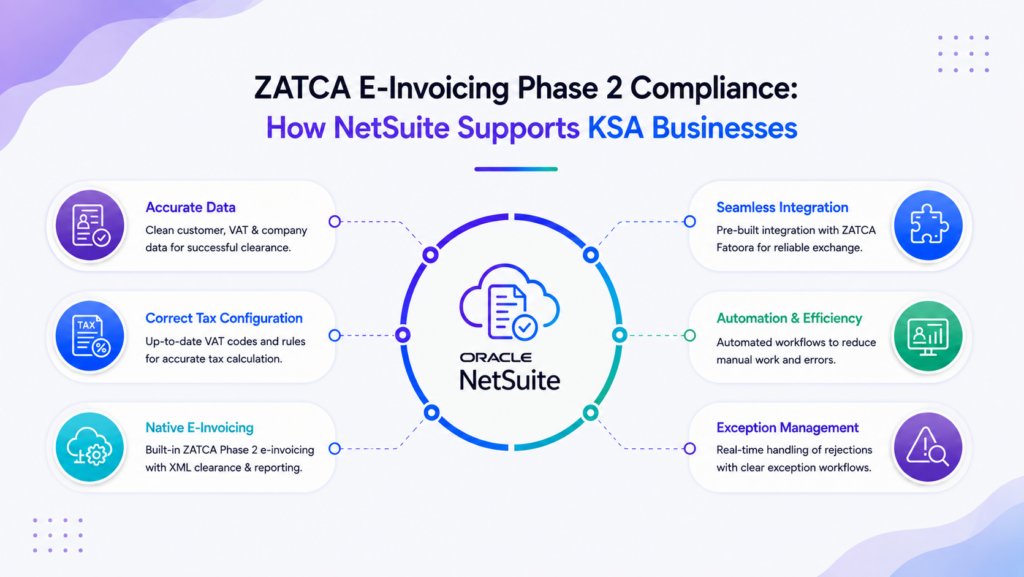
What Is ZATCA Phase 2 E-Invoicing?
ZATCA Phase 2 e-invoicing is the integration stage of Saudi Arabia’s national e-invoicing mandate, requiring in-scope businesses to connect their invoicing systems directly to ZATCA’s Fatoora platform for real-time invoice validation.
ZATCA stands for the Zakat, Tax and Customs Authority, the government body responsible for tax collection and enforcement in Saudi Arabia. Saudi Arabia’s e-invoicing mandate is split into two phases. Phase 1, known as the Generation phase, began in December 2021 and simply required businesses to generate and store invoices electronically instead of on paper. Phase 2, known as the Integration phase, started on January 1, 2023, and requires applicable taxpayers to connect their electronic invoicing solution directly to ZATCA’s systems through an API, so invoices can be validated, cleared, or reported in near real time.
Phase 2 has not applied to every business at once. Instead, ZATCA is rolling it out in waves, grouping taxpayers by annual taxable revenue and giving each group a set deadline to integrate. Every wave so far has lowered the revenue threshold, which means the mandate is steadily expanding toward covering nearly all VAT-registered businesses in the Kingdom.
ZATCA maintains an official educational library to support this rollout, including simplified e-invoicing guidelines, detailed technical guidelines, the Fatoora portal user manual, and full developer documentation for businesses and software vendors building integrations.
What Is the Difference Between Phase 1 and Phase 2?
Phase 1 required businesses to stop issuing paper invoices and instead generate structured electronic invoices with specific fields, including a QR code on simplified invoices. There was no requirement to connect to ZATCA’s systems during this phase.
Phase 2 adds a direct integration requirement. Standard tax invoices, typically used for business and business to government transactions, must be cleared with ZATCA before being shared with the customer. Simplified invoices, typically used for business to consumer transactions, must be reported to ZATCA within twenty-four hours of issuance. Both invoice types need a cryptographic stamp, a unique identifier, and a digital signature that Phase 1 did not require.
Who Needs to Comply with ZATCA E-Invoicing?
Every resident, VAT-registered taxpayer in Saudi Arabia has been required to comply with Phase 1 since December 2021. Phase 2 compliance depends on which wave a business falls into, based on taxable revenue in 2022, 2023, 2024, or 2025. Earlier waves targeted large enterprises with revenue above several hundred million riyals. More recent waves have pulled in progressively smaller businesses, with the latest wave setting the threshold at SAR 187,500 in any of those years. Non-resident taxpayers are currently exempt from the e-invoicing requirement.
How Does ZATCA Phase 2 Work?
Once a business falls within a wave, ZATCA notifies the taxpayer directly, generally around six months before their integration deadline. The business must then register on the Fatoora portal, obtain the required cryptographic credentials, and connect its invoicing or ERP system to ZATCA through an API. From that point forward, every standard invoice goes through a clearance process before it reaches the customer, and every simplified invoice is reported to ZATCA shortly after it is issued.
Key ZATCA Phase 2 Requirements Businesses Need to Understand
Structured Electronic Invoice Data
Every e-invoice under Phase 2 must be generated in a structured XML format, either as a standalone UBL 2.1 XML file or as a PDF/A-3 document with the XML embedded. Free-text PDFs, scanned images, or handwritten invoices no longer meet the requirements. Each invoice needs specific data fields, including a unique invoice identifier, a cryptographic stamp, and a QR code that allows the invoice to be verified electronically.
Data Retention and Auditability
Businesses need to retain e-invoices and their associated data in a way that is easily retrievable and auditable, since ZATCA can request historical invoice data during a review. This makes accurate master data and consistent invoice numbering just as important as the technical integration itself, because gaps or inconsistencies in your invoice history become visible the moment ZATCA asks for a sample.
How NetSuite Supports ZATCA E-Invoicing Compliance
NetSuite Saudi Arabia compliance is built around a dedicated set of localization tools designed specifically for the Kingdom’s e-invoicing requirements. Here is how the platform supports each part of the process.
1. Saudi Arabia E-Invoicing SuiteApp
NetSuite offers a purpose-built Saudi Arabia E-Invoicing SuiteApp that connects your NetSuite account directly to ZATCA’s Fatoora platform. Setting it up requires a valid VAT registration, a certificate signing request, a private key, and a compliance binary security token issued through the Saudi tax portal. The SuiteApp also depends on several supporting components, including the Electronic Invoicing SuiteApp, the Localization Assistant, and country-specific address forms, all of which need to be installed and configured correctly for the integration to work.
2. Electronic Invoice Generation
Once configured, NetSuite generates compliant e-invoices directly from your existing sales orders and invoice records, formatting them according to ZATCA’s structured XML requirements without requiring a separate invoicing system. This keeps invoice generation inside the same workflow your finance team already uses.
3. Saudi VAT Data Management
NetSuite’s Saudi VAT ERP software capabilities allow you to manage VAT registration numbers, tax codes, and reporting periods within the same system that handles your general ledger and accounts receivable. This reduces the risk of mismatched VAT data between your invoicing records and your VAT return filings.
4. ZATCA Integration
Through the E-Invoicing SuiteApp, NetSuite handles the technical exchange with ZATCA’s servers, submitting standard invoices for clearance and simplified invoices for reporting, then recording the resulting UUID and cryptographic stamp back onto the original transaction record inside NetSuite.
5. Centralized Invoice Data
Because e-invoicing runs inside NetSuite rather than a bolted-on external tool, all your invoice data, VAT records, and audit trails live in one place. This is particularly valuable for businesses using NetSuite OneWorld across multiple GCC entities, since finance teams can see Saudi compliance status alongside operations in the UAE and other countries from a single dashboard.
6. Automated Compliance Workflows
NetSuite can be configured to flag invoices that fail clearance, hold transactions that are missing required fields, and route exceptions to the right team member automatically, reducing the manual monitoring finance teams would otherwise need to do invoice by invoice.
NetSuite ZATCA Compliance Workflow for Saudi Businesses
In practice, the workflow looks like this. A sales order is created and converted into an invoice inside NetSuite as normal. NetSuite formats the invoice according to ZATCA’s structured XML standard and applies the required cryptographic stamp. The invoice is then submitted to ZATCA through the E-Invoicing SuiteApp, either for clearance if it is a standard invoice or for reporting if it is a simplified invoice. ZATCA validates the invoice and returns a UUID and clearance status, which NetSuite records against the original transaction. The finalized, ZATCA-approved invoice is then shared with the customer, and the full record, including the clearance response, remains stored inside NetSuite for audit purposes.
Real-Time Invoice Reporting in KSA: What Businesses Should Know
Real-time invoice reporting KSA requirements mean that compliance is no longer something you check once a quarter during VAT filing. Every invoice, or in the case of simplified invoices, every batch reported within twenty-four hours, is checked against ZATCA’s system as it happens. This has a direct operational impact: any weakness in your invoicing process, from incorrect VAT registration numbers to inconsistent customer records, surfaces immediately rather than being caught later during a VAT return review. Businesses that treat e-invoicing as a background IT project rather than a live operational process tend to run into clearance failures right when they can least afford transaction delays.
Benefits of Using NetSuite for ZATCA Compliance
Running your e-invoicing compliance inside NetSuite rather than through a separate bolt-on tool keeps invoice generation, VAT reporting, and financial records in a single system, which reduces reconciliation work and the risk of data mismatches. It also means compliance scales naturally as your business grows, since the same configuration that handles your current invoice volume can support additional subsidiaries, currencies, or entities through NetSuite OneWorld without requiring a separate compliance platform for each one. For finance teams, having ZATCA clearance status visible alongside the invoice itself, rather than in a disconnected external portal, makes exception handling considerably faster.
Common ZATCA Phase 2 Compliance Challenges for KSA Businesses
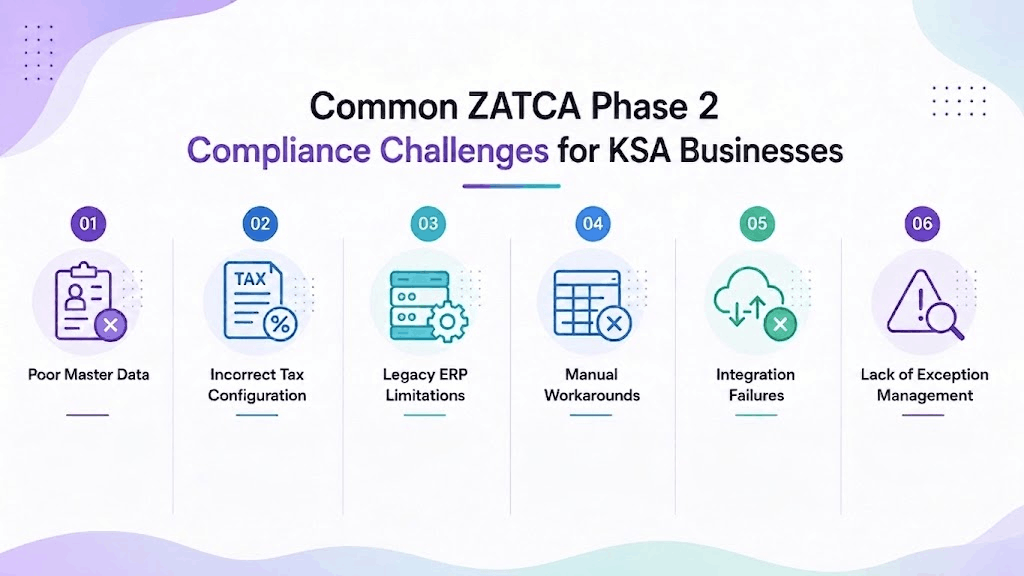
Poor Master Data
Incorrect or incomplete customer VAT registration numbers, addresses, or company details are one of the most common causes of invoice clearance failures. ZATCA validates this data as part of the clearance process, so errors that were previously harmless now block invoices in real time.
Incorrect Tax Configuration
VAT codes that are misapplied, outdated, or inconsistent across product and service records will produce invoices that fail validation or, worse, pass validation with the wrong tax amount, creating compliance exposure that only surfaces during an audit.
Legacy ERP Limitations
Older or heavily customized ERP systems that were never designed with structured XML e-invoicing in mind often require expensive middleware or manual workarounds to meet ZATCA’s technical requirements, adding cost and fragility to what should be a straightforward compliance process.
Manual Workarounds
Businesses that try to bridge the gap with spreadsheets, manual XML generation, or semi-automated processes tend to introduce errors and struggle to keep pace once invoice volume increases, particularly around the 24 hours reporting window for simplified invoices.
Integration Failures
A poorly configured or improperly tested connection to ZATCA’s Fatoora platform can result in invoices failing or being rejected, requiring manual intervention to resolve ZATCA response errors. Businesses sometimes only catch these issues during a VAT audit, long after the underlying transactions have taken place.
Lack of Exception Management
Without a defined process for what happens when an invoice is rejected or fails clearance, exceptions can sit unresolved, creating a backlog of non-compliant transactions that grows harder to clean up the longer it is left unaddressed.
How to Prepare NetSuite for ZATCA Phase 2
-
- Confirm ZATCA applicability and your wave. Check your taxable revenue for 2022 through 2025 against the current wave thresholds to confirm whether and when your business needs to integrate, and watch for ZATCA’s direct notification confirming your deadline.
-
- Audit your existing ERP and invoicing processes. Review how invoices are currently generated, numbered, and stored, and identify any manual steps or workarounds that will not hold up under a structured, real-time compliance requirement.
-
- Validate your master data. Clean up customer and vendor VAT registration numbers, addresses, and tax classifications before configuration begins, since inaccurate master data is the leading cause of clearance failures after go-live.
-
- Review your NetSuite localization. Confirm your NetSuite environment has the necessary localization features enabled, including SuiteTax or the applicable tax engine, and that your subsidiary and address records meet Saudi formatting requirements.
-
- Configure e-invoicing. Install and configure the Saudi Arabia E-Invoicing SuiteApp along with its prerequisite components, and set up the certificate signing request, private key, and compliance binary security token needed to connect to ZATCA.
-
- Configure the integration. Establish and test the live connection between NetSuite and ZATCA’s Fatoora platform, confirming that both standard invoice clearance and simplified invoice reporting are working correctly.
-
- Test thoroughly. Run a full set of test transactions covering your typical invoice scenarios, including edge cases like credit notes, discounts, and multi-currency transactions, before relying on the system for live production invoices.
-
- Train your finance team. Make sure the people issuing and approving invoices understand what a clearance failure looks like inside NetSuite and know exactly what to do when one occurs, rather than treating it as a technical issue for IT to resolve later.
-
- Monitor closely after go-live. Track clearance of success rates and exception volumes in the weeks after go-live, since this is when data quality issues and edge cases are most likely to surface.
Why Work with a NetSuite Partner for ZATCA Compliance?
Vantheon Technologies helps businesses across Saudi Arabia, the UAE, and the wider GCC configure NetSuite for real-world compliance, not just a technical checkbox. Our team has hands-on experience setting up the Saudi Arabia E-Invoicing SuiteApp, validating master data before go-live, and building the exception handling processes that keep finance teams ahead of ZATCA’s clearance requirements rather than reacting to failures after they happen. We combine this Saudi Arabia NetSuite services experience with broader regional expertise, so multi-entity businesses running NetSuite OneWorld across the GCC get one consistent compliance approach instead of a patchwork of country-by-country fixes.
Conclusion
ZATCA Phase 2 is not a one-time project. With wave thresholds dropping steadily and enforcement tightening after each penalty waiver period ends, e-invoicing compliance is quickly becoming a standing requirement for nearly every VAT-registered business in Saudi Arabia. NetSuite gives businesses a way to meet this requirement inside the same system that already runs their finances, provided the underlying setup, master data, and integration are done correctly. Getting that setup right the first time, with proper testing and a clear exception process, is what separates businesses that treat ZATCA compliance as routine from those still firefighting failed invoices months after go-live.
Planning your ZATCA Phase 2 compliance in Saudi Arabia? Speak with Vantheon Technologies to assess your NetSuite setup and build a compliance roadmap that holds up under real-time invoice reporting.
Vantheon supports your NetSuite journey beyond e-invoicing. Our services include NetSuite implementation services for businesses starting fresh, NetSuite consulting services to plan your ERP roadmap, and NetSuite integration services to connect NetSuite with your banking, payroll, and third-party systems. For Saudi Arabia specifically, we deliver NetSuite e-invoicing solutions built around ZATCA’s Fatoora platform, alongside NetSuite customization services and NetSuite OneWorld implementation for businesses managing multiple GCC entities. Our NetSuite support services keep your compliance workflows running smoothly after go-live, and our NetSuite automation solutions and AI-powered finance automation help finance teams reduce manual invoice handling even further. If you are also evaluating your broader ERP strategy, our team acts as a NetSuite implementation partner in UAE and across the GCC, not just for Saudi compliance projects.
Schedule a demo with Vantheon Technologies to start preparing your NetSuite environment for ZATCA Phase 2.
Frequently Asked Questions
1. What is ZATCA Phase 2 e-invoicing?
ZATCA Phase 2 e-invoicing is the integration stage of Saudi Arabia’s e-invoicing mandate, requiring applicable businesses to connect their invoicing systems directly to ZATCA’s Fatoora platform so invoices can be cleared or reported in near real time. It has applied in waves since January 2023, based on taxable revenue.
2. Can NetSuite support ZATCA Phase 2 compliance?
Yes. NetSuite offers a Saudi Arabia E-Invoicing SuiteApp that connects directly to ZATCA’s Fatoora platform, allowing businesses to generate, submit, and track compliant e-invoices from within their existing NetSuite environment.
3. Does NetSuite support Saudi VAT and ZATCA e-invoicing?
NetSuite supports Saudi VAT management alongside ZATCA e-invoicing through its localization tools and the E-Invoicing SuiteApp, allowing tax codes, VAT registration data, and e-invoice submissions to be managed within the same system.
4. What is the difference between ZATCA Phase 1 and Phase 2?
Phase 1 requires businesses to generate and store electronic invoices instead of paper ones, with no system integration required. Phase 2 requires businesses to connect their invoicing system directly to ZATCA for real-time clearance of standard invoices and reporting of simplified invoices within 24 hours.
5. Does ZATCA Phase 2 require real-time invoice reporting?
Yes. Standard invoices must be cleared with ZATCA before reaching the customer, and simplified invoices must be reported to ZATCA within 24 hours of issuance, making near real-time invoice reporting a core requirement of Phase 2.
6. How can a NetSuite partner help with ZATCA compliance?
A NetSuite partner with direct ZATCA implementation experience can configure the E-Invoicing SuiteApp correctly, validate your master data before go-live, test the integration thoroughly, and set up exception handling so failed invoices are caught and resolved quickly rather than accumulating unnoticed.